Production bugs are an unavoidable part of any mature software product, even when the application is well-tested. While many of these issues seem minor at first glance, their effects can be much more significant than expected. Even small UI failures can disrupt essential user workflows, delay important actions, and gradually weaken customer trust.
The true cost of bugs extends beyond fixing them to include the operational overhead: developers must pause, switch tasks, investigate, and push fixes through delivery. Consequently, issues that could be fixed quickly often remain open for hours or days.
To address this inefficiency, our frontend team explored a more automated, AI-supported approach to fixing production bugs using BugSnag, GitHub Issues, and Claude Code.
In the experimental phase, Claude Code solved 15 out of 15 simple bugs based solely on the stacktrace, generating ready-to-review PRs. The results? Faster fixes for revenue-impacting errors and more team capacity for feature development.
This case study presents the context of this experiment, the implementation approach, and the detailed results.

The Context
Project Overview
Our team works for a client with an enterprise marketing automation platform: a SaaS product built with Angular that supports business-critical processes, including payments. The frontend team is responsible for both shipping new features and maintaining production stability.
The Challenge
The main challenge we encounter is the bugs.
BugSnag monitors the application and catches runtime errors. Most of them are trivial but painful for users, such as a dialog refusing to close due to a dependency injection issue with DialogRef, undefined values where a component expects data, or minor race conditions in async flows.
Each of these bugs is straightforward for an experienced developer and takes 5–15 minutes of work to fix.
However, it costs time, money, and focus:
1. A bug in the payment dialog literally blocks revenue (this happened to us).
2. A developer has to drop their current task, analyze the stacktrace, locate the issue, and write a fix, and context switching between feature work and bug fixing drains the entire team’s productivity.
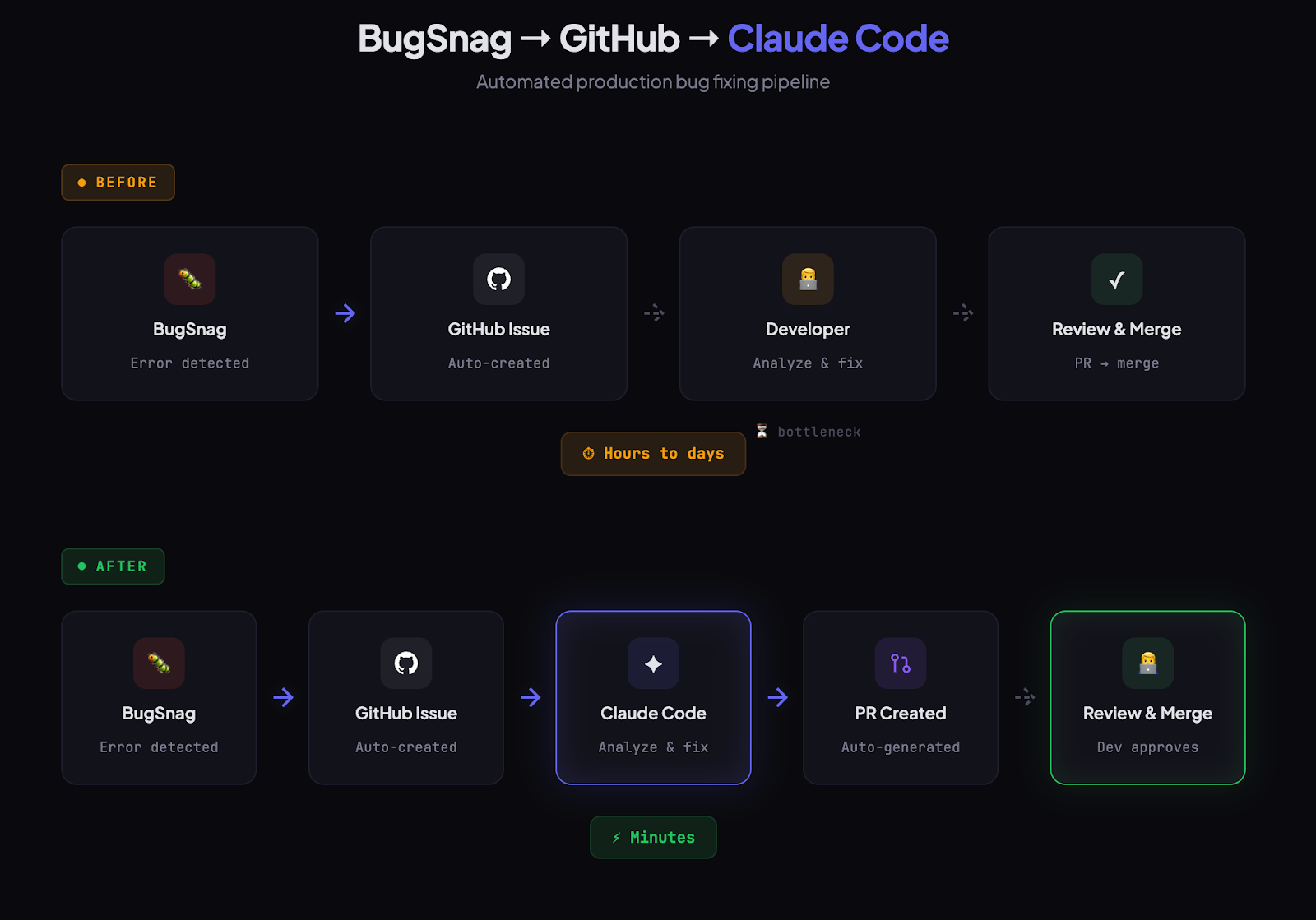
That’s why I realised that the previous flow was not passing the test:
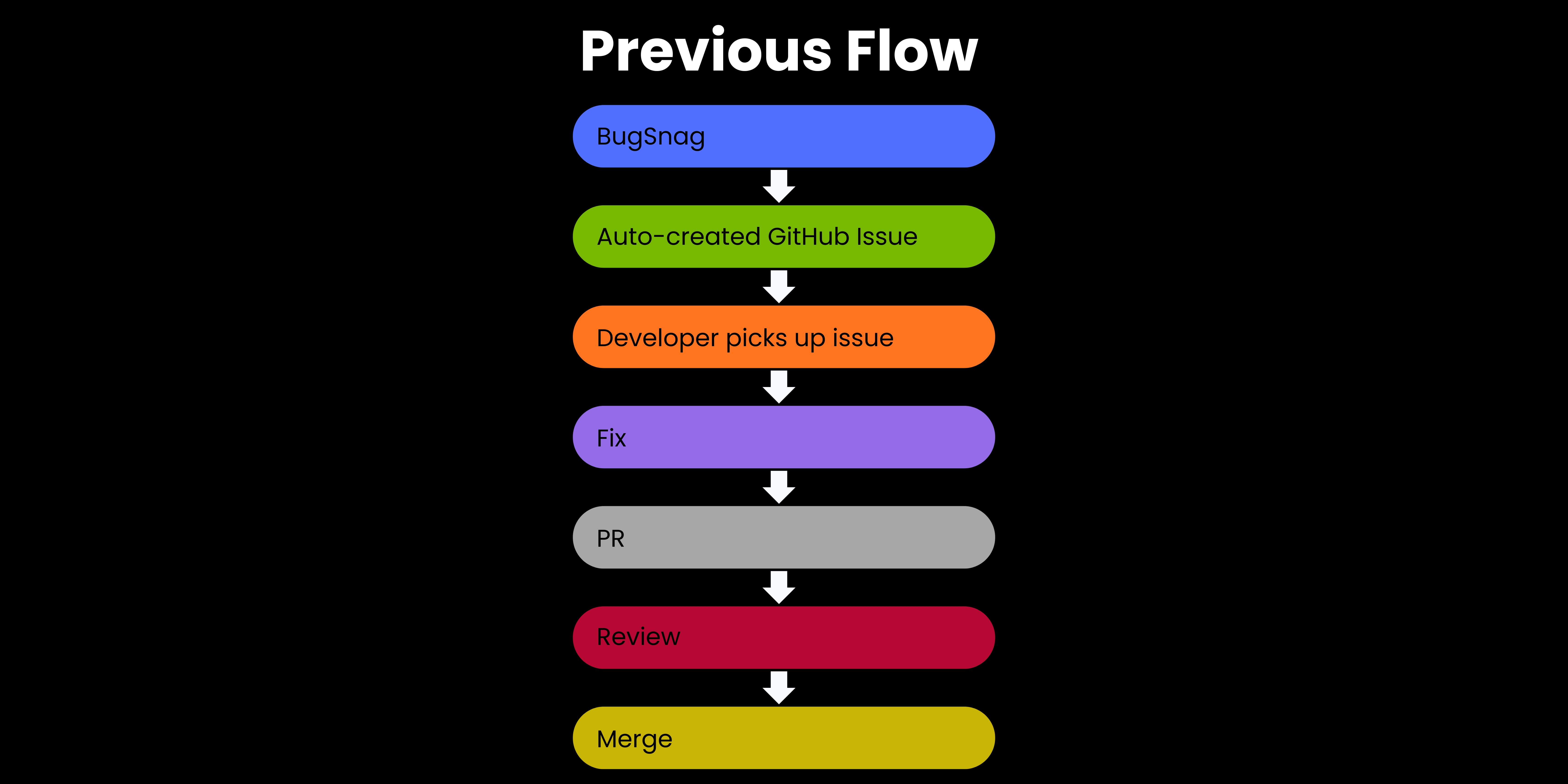
Time from detection to merge in this case? Hours to days, depending on team workload!
The Solution
A New Flow with Claude Code:
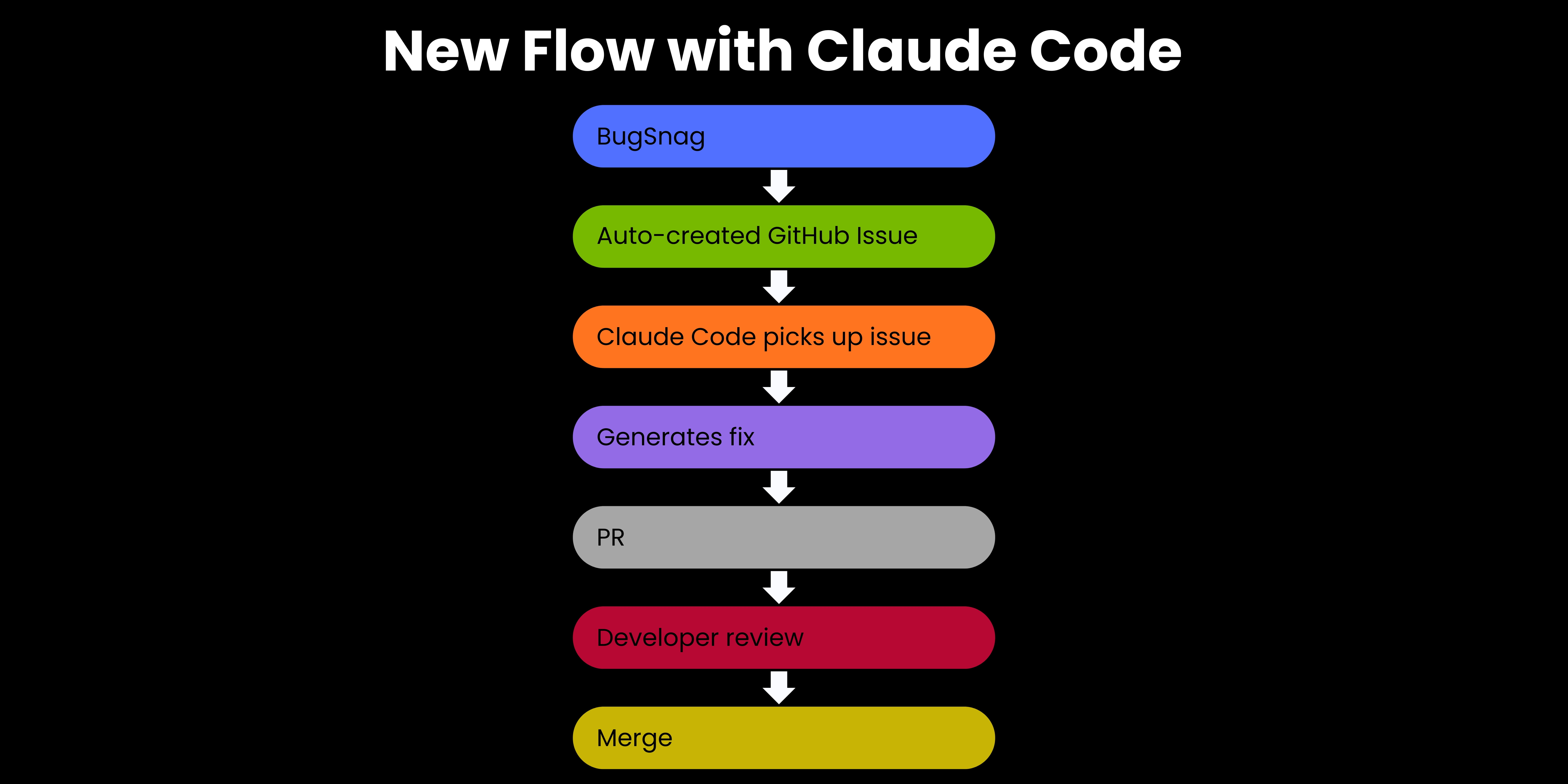
To fix this, I’ve decided to add a Claude Code integration to the existing BugSnag → GitHub pipeline to make the process much more efficient and less painful for both the team and the client.
Thanks to that simple addition, when Claude Code is triggered, it:
1. Reacts to a newly created GitHub Issue
2. Analyzes the stacktrace and error context
3. Locates the problem in the codebase
4. Generates a fix and opens a PR with a description of changes
5. Waits for developer review
What I Needed to Set it Up
To set up this integration, I needed only:
- An existing BugSnag → GitHub Issues integration (already in place)
- Claude Code connected to the GitHub repository
- A trigger configured: new issue → Claude Code attempts to resolve
No changes to the application architecture or team process were needed. I simply added one additional step in an existing flow.
The Results
From the Experimental Phase
In the experimental phase of this process, I checked a few important parameters that could indicate whether adding a Claude Code integration to the BugSnag → GitHub pipeline was, in fact, beneficial.
Here are the results:
| Metric | Value |
| Bugs attempted | 15 |
| Successfully resolved | 15 (100%) |
| Bug types | Trivial — undefined, DI, dialog lifecycle |
| Post-review corrections needed | None — merged as-is |
As you can see, all 15 bugs were resolved based on the stacktrace alone.
Additionally, Claude Code required no additional context or developer instructions.
Impact on the Team
To get a fuller picture, I decided to assess the impact of my innovation on the development team, particularly on their workflow.
Here’s what I observed:
- Revenue protection. Critical paths (e.g., the payment dialog) get fixed practically immediately.
- Developer time on trivial bugs: ~0. A ready-made PR arrives; just review the diff and approve.
- Faster response time. A bug can be fixed within minutes of appearing in BugSnag, instead of waiting for a developer to find time.
- More focus on feature work. The team isn’t pulled out of context by minor production issues.

Limitations and My Honest Assessment
Summing up my experiences, BugSnag + Claude Code work well for bugs with a clear stacktrace and an obvious root cause (undefined, missing dependency, lifecycle error), problems localized to a single file or component, as well as recurring error patterns that AI can recognize from code context.
However, there are some scenarios I haven’t tried this combo in: bugs that require an understanding of business logic, issues spread across multiple modules, race conditions that require scenario reproduction, and errors caused by backend interactions.
| What BugSnag + Claude Code Is Perfectly Suited For | What I Haven’t Tested / What May Not Work |
| bugs with a clear stacktrace | bugs that require an understanding of business logic |
| bugs with an obvious root cause | issues spread across multiple modules |
| problems localized to a single file or component | race conditions that require scenario reproduction |
| recurring error patterns | errors caused by backend interactions |
With all this in mind, we can identify two risks associated with the used solution:
- False confidence: a PR looks clean, but the fix masks a deeper problem. That’s why developer review remains mandatory.
- Scale: 15 bugs is a promising result, but too small a sample for hard conclusions. The experiment continues.
Key Takeaways from the Project
For Tech Leads
This solution isn’t about replacing developers. Instead, AI acts as an intelligent assistant, taking on repetitive, time-consuming tasks. By taking on these responsibilities, AI allows developers to concentrate on the more complex aspects of software engineering.
For Teams with Error Tracking
If you already have a BugSnag/Sentry → GitHub Issues pipeline, you’re one step away from implementing automated fixes. The barrier to entry is minimal, making it accessible for most teams to experiment with AI-powered automation.
Summary
AI in software development doesn’t have to solve hard problems to deliver real value. Even when applied to the simplest of challenges, it can make a measurable difference. The true advantage is enabling developers to dedicate their time and expertise to the tasks that have the greatest impact—solving complex problems, shaping architecture, and driving meaningful progress.
By letting AI handle the routine, you give your developers space to make meaningful contributions and build smarter, more robust solutions.
*Experiment ongoing. I’ll update this case study as more data comes in.


 5 min
5 min