How to Implement AI & Measure AI ROI in Software Development
We now live in an era of AI-generated code.
According to DX’s AI impact analysis for Q2 2026, on average, 51.9% of code is now AI-authored. That’s almost double the Q1 figure of 27.4%. At the same time, GitHub Copilot alone reported a 75% year-over-year increase in paid subscribers at the start of this year.
The impact of AI on development teams is undeniable. Using AI for coding has quickly become the industry standard, and everyone wants it on their team. After all, it promises faster time-to-market and lower costs.
But what if I told you that most businesses are actually losing, not gaining, from AI use right now?
In this article, I’ll explain how teams end up hurting themselves through poor AI implementation, how to do it the right way, and how to measure AI ROI, so you actually know whether it’s working.
Key Takeaways
- AI adoption is at an all-time high, but adoption isn’t the same as it working. Most businesses are struggling to turn AI use into measurable gains.
- Shadow AI is one of the biggest risks most teams aren’t tracking. Developers using personal accounts to access AI tools are quietly feeding your source code into external systems, often without realizing it.
- AI writes code fast, but decisions, reviews, QA, and sign-offs haven’t kept pace.
- AI generates more code, not necessarily better code. Code duplication, churn, and maintainability issues have consistently moved in the wrong direction since AI coding went mainstream.
- The fix isn’t one big change, but a set of concrete practices around standardization, governance, and code quality that together turn chaotic AI adoption into something you can actually control and build on.
- The metrics most teams track tell you how much AI is being used, not whether it’s helping. The ones that actually matter are lead time, deployment frequency, PR cycle time, code duplication, and a short recurring developer survey.
Why do businesses struggle with good AI implementation and efficient measurement of AI? 3 common bottlenecks
AI coding is the industry standard now, and the adoption numbers back that up. But adoption isn’t the same as it working. Look at what DigitalApplied found in their AI Coding Tool Adoption 2026:
- Developers now spend 11.4 hours a week reviewing AI-authored code versus 9.8 hours writing new code.
- Estimated productivity levels increase by 34% in the first 60 days, then flatten. The gains stay concentrated in specific task types rather than across the board.
So adoption is high, but the payoff is uneven at best.
From what we’ve seen working with our clients’ dev teams, that gap usually comes down to 3 bottlenecks that keep AI adoption from actually being successful and measurable.
Bottleneck 1: Shadow AI
In Verizon Business’ 2026 Data Breach Investigations Report, we read that 67% of employees use non-corporate accounts on their corporate devices to access AI services. This comes from DLP (Data Loss Prevention) telemetry pulled from Verizon’s network of nearly 100 data contributors, ranging from incident response companies and cyber insurers to law enforcement agencies.
Paired with the fact that in May–July 2026, 90% of polled developers were using AI coding agents at work at least weekly, as reported by JetBrains Research, we can conclude that most of the AI running through your dev team’s daily workflow is probably happening completely off radar.
That’s a problem we call “Shadow AI”: using generative AI tools on corporate devices without the knowledge, approval, or oversight of the organization’s IT or security team.
Why is it dangerous for businesses, and especially for development teams?
The same 2026 DBIR Report underlines that last year, Shadow AI became the third most common non-malicious insider behavior flagged in their DLP data. The scale of it grew about 4 times compared to the previous year. And the number one thing employees were feeding into external GenAI tools was… source code!
Your developers, trying to move faster, paste fragments of your project’s source code into AI tools on unauthorized or private accounts to debug or generate code, probably without realizing that each query is potentially your company’s intellectual property walking right out the door.
Shadow AI has another drawback, too. Atlassian estimates that developers lose 10 hours a week to inefficiencies connected to AI. Many of them could be resolved by standardizing AI use, for example, to minimize context switching. In other words, inconsistent AI use within development teams can cost time instead of saving it.
Fortunately, it’s fixable. For example, our House of Angular team recently audited AI use for one of our European clients and found that Shadow AI was widespread across their dev team. Once we unified how the team used AI, they got back an extra 10 hours a week that would otherwise be wasted, but can now be used for meaningful project work. I’ll share the strategies we used later on.
🤖 Our Team Lead built a Figma-like canvas viewport for our client’s pop-up editor in 4 hours with AI. Read the case study.
Bottleneck 2: Code ships fast, business moves at old speed
Before AI, coding speed was the bottleneck. If delivery was too slow, you brought in Agile practices, changed up how you managed shipping velocity and code quality, and that fixed it.
Now velocity isn’t the problem: AI noticeably speeds up shipping code. The problem is that the business side of many projects hasn’t caught up.
Here’s a graph I made of a single development loop, for example, shipping one feature with AI incorporated into the process, based on what I’ve observed in different client projects:
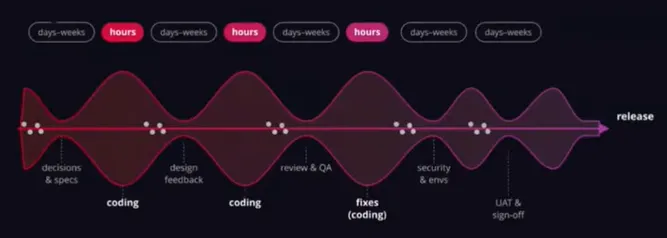
As you can see, I noticed that each phase of coding usually takes just a few hours, accelerating the whole process. What stalls it are the moments in between: decisions, feedback, review, QA, sign-offs. Many businesses simply can’t keep pace with the code.
Our observations from various client projects show that before AI, the split between writing code and waiting on business decisions needed to keep development moving was roughly 50:50. Now, we observe it’s closer to 1:5.
This means that if the business processes in your project that influence development still look the same as before adopting AI, the speed you gained in producing code simply gets bottlenecked elsewhere.
Part of the reason for that also ties directly to bottleneck number 3.
Bottleneck 3: AI generates more code, not better code
AI works based on statistics. It copies patterns it sees and extends them, but it often doesn’t truly understand your architecture. So while it generates code quickly, the quality can fall short of expectations.
GitClear’s “The Maintainability Gap: AI Code Quality in 2026” found, across four years of code-change data, that maintainability signals have consistently moved in the wrong direction:
- within-commit copy/paste up 41% since 2023
- code block duplication up 81%
- error-masking constructs up 47%
- two-week code churn up 15%
CodeRabbit’s December 2025 study adds to that picture: AI-generated code carries 1.7x more issues than code written by developers.
That’s a real problem. Poor code quality makes things like code review harder and slower, which feeds straight into bottleneck 2, and it makes the codebase harder to maintain over time.
It can hurt your ROI, too. Every duplication adds unnecessary code to your codebase, and that code might go into context. More context means more tokens burned on every context-based task, which quietly drains your budget. That’s why volume is the silent killer of AI ROI.
How to fix it: best practices for implementing and scaling AI in your team
As we can all see, the AI hype phase is over. We now have real data on how it actually affects development teams, and that puts us in a new stage: management. It’s not enough to implement AI well, you also have to control how it’s used and measure the results. That needs a solid foundation first.
So let’s begin there: fixing the three bottlenecks above to build that foundation, then moving on to measuring, so you can confidently build on top of it.
Here are the practices I use as a CTO, and that our team at House of Angular uses, to keep AI from getting out of hand in our projects.
Start with a baseline: know your team’s AI maturity level
To start improving anything around AI use, you need to know where your team (or teams, measured individually) already stands. You can run or outsource an audit, or use an AI maturity assessment tool, like this ready-to-use, free survey we built.
How to use it:
Copy our ready-made questionnaire using this link. Go through the questions and see if anything’s missing that your team specifically needs. Then publish it and send it out to your dev team. If you need help interpreting the results or you’re not sure what to do with them, reach out. We’ll help for free on a short call.
That gives you a starting point. You’ll know what’s already working and what isn’t, so you’re not wasting time on changes you don’t need, and go straight to what actually matters.
Use the potential you already have: identify the AI champions
Pay attention to your early adopters, the people who are genuinely into AI and follow what’s happening in the space. Pick one person from the team (or one per team, if you have several) and give them space to share ideas and knowledge with the rest. They’re the ones who’ll drive innovation on your team, as long as you give them motivation and real recognition for it.
💻 Case study: See how you can reclaim valuable time your devs spend investigating and pushing fixes through delivery, with the help of Claude Code.
Unify your team’s AI use
As I mentioned earlier in this article, standardizing how your team uses AI is exactly what gets you those hours back that would otherwise go to waste on unstandardized, ungoverned AI use.
Here’s a list of things you should take care of: download checklist.
This narrows the gap in code quality across the team, saves your developers time otherwise lost to context switching and broken prompts, and lays the groundwork for measuring all of this properly later on.
Move to spec-driven development
This goes a step further than a shared memory file. Instead of keeping your source of truth in documentation somewhere in Google Drive or Jira, SDD (Spec-Driven Development) puts it directly inside the agent, as the base it uses to generate and validate code.
That specification isn’t static either. Sync it with Jira, Slack, and meeting notes, and every agent works from the same current source of truth instead of documentation that’s a few weeks out of date. That’s a big part of why teams using this approach report far fewer “rebuilt from scratch” cycles: the agent builds against a spec that reflects where the project currently stands.
There are also commands for Claude Code, Codex, and Copilot that help you build this kind of specification right in your IDE, so you don’t spend too much time on it.
One thing to watch out for, though: it’s easy to generate more specification than the project actually needs. Make sure your agents only get relevant information, and it’ll pay off.
Example from our own work: On a recent project, we had our specification synced with Jira, Slack, and a few other project management tools. When we decided to change how testing worked in that project, the agent ran the new tests itself, straight from the specification, no back-and-forth needed. What would’ve taken a few days of work got done overnight.
Be careful with experiments
Don’t switch things up too soon, unless it’s actively causing harm or is clearly not working at all. If something doesn’t seem like the perfect fit right away, give it around two months before trying something else. Otherwise, you won’t have enough data to tell whether it works.
If you have tokens to spare, experiment. Just don’t waste them on chasing every new idea instead of sticking with what you’re testing.
Accelerate the decision-making process yourself
1. Generate proposals
First, make sure you store your project guidelines (like style guides) in an .md file. Then generate quick, cheap HTML prototypes even before a client decision lands, cheap enough to be disposable.
Example from one of our client projects: A few lightweight skills let us generate client proposals in HTML almost instantly, quickly enough to send three different options for the client to choose from, instead of spending time figuring out and describing exactly what they wanted from scratch. That alone sped up the decision-making process significantly.
2. Make the call, flag it for the agent
Where you can’t wait, make the call yourselves and flag it clearly as a decision point for the AI agent.
In the past, you’d have to wait for the client’s actual decision, since reworking things after a mismatched vision took a lot of time. Now, if your call turns out to be wrong, you just tell the agent to change it, and it goes straight to the flagged point to fix it.
3. Push more decisions to developers
It’s cheaper than ever to code first and adjust later, so let developers make more low-risk calls directly. Just make sure they know what decisions they can and cannot make first.
In reviews, use deterministic tools first
Lean on deterministic tools first, like static analysis and PR checks, before bringing in LLM-based review. LLM review isn’t fully deterministic on its own: the same code checked twice can get different feedback, so you can’t rely on it as your only line of defense.
Deterministic tools are also cheaper (no tokens used) and faster to set up, so they’re the easiest place to start.
The order that works best: deterministic checks catch the obvious stuff first, LLM review catches what those checks miss, and you make the final call on anything that actually matters.
Measure duplication and churn
Track code duplication and PR volume in CI. Available tools make this cheap and continuous, so you get it as part of the pipeline you already run, not a separate audit you have to remember to do.
This will only matter more with time, since tokens are getting more expensive, and every bit of duplicated code adds to the context an agent has to carry on each task.
Make refactoring a routine
Refactoring used to mean rewriting chunks of code, eating up time and budget, so most teams put it off until something started breaking. With AI, that changes, if you know how to do it right.
Say you have one feature, and you ask an agent to build something similar. Most of the time, it’ll just copy the existing code. After a few features like this, it might look like the smart move is a more reusable architecture. But if you ask an agent to build it, it’ll probably just duplicate the code again.
However, if you ask it to refactor instead, it can actually spot the pattern: “I have five similar features here, let’s refactor, go more abstract, and cut the duplication.”
Build this into every sprint, instead of treating it as an afterthought. This way, the codebase stays lean instead of piling up duplicated code sprint after sprint.
Protect your IP
Confirm your data exclusion settings on any paid AI tool, and consider self-hosted models for your most sensitive code.
Most enterprise plans have a “don’t train on my data” checkbox, and it does its job, but it doesn’t guarantee that nothing will ever leak. If you’re dealing with your actual “crown jewels”, the code that absolutely cannot get out under any circumstances, it’s worth looking at an on-premises LLM you control end to end.
Free versions of these tools are the riskiest option here: with no paid contract behind them, your data is often the thing paying for the product.
💡 Our Tech Lead migrated our client’s live production dashboard from AngularJS → Angular 21 in just 1 day with AI. Read his case study.
Managing AI in software development: measure delivery, not tokens
Once you’ve got AI implementation in place, what’s left is measuring and managing it well. Most teams get this part wrong: they track token usage, lines of code, or tool adoption rates, numbers that look good on a dashboard but say nothing about whether AI is actually helping ship better software faster. The fix is tracking the right things in the first place.
What NOT to measure if you want to know whether AI is actually working
These are the metrics teams reach for most often, but only show you how much AI is being used, not whether AI is actually making your team faster.
Number 1: your team’s self-assessment
Using this kind of metric puts the business in the position of trusting a feeling instead of a number.
If you’re deciding whether AI is worth the spend or whether to expand it to more teams, “the team feels faster” isn’t something you can put in front of a budget owner or use to justify the next investment. You need something you can actually stand behind when someone asks for proof.
Number 2: raw tokens burned, as a productivity signal
If I were to explain this trap in a nutshell, I’d say it’s like paying firefighters per fire they put out. The only thing you’ll get out of that is firefighters who start setting their own fires to get paid more.
Measuring AI by tokens burned pushes people toward the same instinct, even when nobody’s trying to cheat the system. If token usage is what gets reported, why bother refining one prompt when you can just fire off three and pick the one that works? Why fix something small by hand when letting the agent handle it counts toward the numbers that matter? That’s just what happens naturally when a metric rewards volume over outcome, and none of it makes anyone actually faster.
Number 3: old velocity or story-point estimates, on their own
Velocity and story points were built for a world where writing code was the bottleneck, but as we established, with AI, that assumption no longer holds.
Code gets written fast now, and the time has shifted to reviews, QAs, feedback, and waiting on decisions, which we’ve covered above. So, a team can now close the same number of story points, or more, and still be just as stuck. And velocity tracks how much got shipped. It says nothing about how much time it actually took to get there or where that time went.
So, what should you measure instead?
Delivery, not declarations
Lead time and deployment frequency.
Measure how long it takes from writing code to actually shipping it to production and how often you ship. These two metrics measure the whole path from work started to work delivered, not just the coding part.
If AI is genuinely helping, this is where it should show up: shorter lead times, more frequent deployments, not just “we wrote more code.”
Flow: PR cycle time, age of review queue
Check how long a pull request sits open from creation to merge and how long PRs are stuck waiting for someone to actually look at them.
Both catch the exact bottleneck we talked about earlier: AI can make writing code nearly instantly, but if PRs then pile up waiting for review, you haven’t gained anything, you’ve just moved the wait somewhere else.
Code health
Check the amount of duplication and defects that escape to production. If both are climbing, you’re shipping more code, but not necessarily better code, and that gap tends to show up later, in maintenance costs and incidents.
Together, these two numbers tell you whether AI is helping you ship good code or just more of it.
People: the same short developer survey, every quarter, tracked over time
Not a one-off gut check like the “do you feel faster” question we already ruled out. I’m talking about the same short survey, repeated on a schedule, so you can see the trend rather than one snapshot.
What you can ask about:
- How much time do you spend reviewing AI-generated PRs compared to regular ones?
- How much do you trust AI-generated code without additional verification?
- How often do you need to rewrite or fix AI-generated code before it’s mergeable?
- Is AI actually helping with the type of work you do most often?
- What’s the biggest thing slowing you down when working with AI right now?
A single answer means little on its own, but if trust in AI-generated code keeps climbing quarter over quarter, or the time spent reviewing AI PRs keeps shrinking, that’s a real trend, and it’s worth paying attention to.
Summary
By now it should be clear: your team is already using AI, approved or not. Now, it’s up to you whether you’re steering that process or just watching it happen.
The teams that come out ahead here run AI like they’d run any other major shift in how they work: a toolset everyone agrees on, a shared source of truth, guardrails on what ships without review, and numbers that actually tell them whether it’s paying off.
Not glamorous work, but it’s the difference between AI compounding your team’s output and AI compounding your technical debt.