Angular vs React in AI Development: Which One Do AI Agents Build Better?
Whether you want to code a prototype, build an MLP product, or ship enterprise features from a strict business spec that has to last for years, these days you will probably get some help from an AI coding agent.
We wanted to see how that agent handles the same app in Angular and React, so we ran an experiment. Here’s what we found.
TL;DR
- We gave the same claude-sonnet-5 AI agent the same cinema booking spec 30 times: 15 runs in Angular, 15 in React.
- Thanks to its typecheck-first build, Angular had an advantage in keeping type errors out of the app: no Angular run shipped TypeScript errors, while 6 React runs did.
- Both frameworks can deliver a highly functional app when the requirements are clear: the median run for both Angular and React met 100% of the 69 acceptance criteria (96.3% of criteria met across all Angular runs, compared to 99.0% across React).
- Angular’s overall criteria met score was slightly reduced by infinite loops in two applications, which prevented functional validation of specific pages.
- Angular runs were slightly cheaper on average: $3.80 vs $3.89 without browser testing by the agent, and $4.39 vs $4.61 with it. With differences this small and only 15 runs per framework, this may be chance rather than a rule.
Isn’t the Angular vs React decision already answered?
There are already quite a lot of articles on this topic. Most of them suggest Angular for enterprise apps and React for small and mid-size ones. And of course, picking a framework your developers already know beats following trends blindly.
So why did I decide to write this article? I felt a lot of that content was opinion-based and missed a measurable, repeatable approach. AI is also moving fast. In my experience, over the last year, agents got much better at writing code, even outside web development. The choice is no longer limited to the most popular frameworks, because agents can work with less popular technologies too. Still, a common assumption is that agents do better with React, simply because there is much more React code out there. I wanted to check if that’s still true, or if Angular can keep up or even do better.
What did we want to find out?
The question we set for ourselves: does the framework affect how many of the app’s acceptance criteria the agent actually delivers? In other words, how many features will work?
My hypothesis before the experiment was that the framework matters less these days. In my opinion, models are “good enough” to ship working functionality when they get clear requirements and a clear tech stack.
How did we measure it?
I wanted the experiment to be as deterministic as possible, so before running anything, we wrote a research methodology. The idea is that anyone who doesn’t trust our numbers can repeat the experiment step by step. In short, it comes down to these rules:
- One variable: the stack. Same model, harness, and spec, with an Angular template (control) vs. a React template (treatment), each using its ecosystem’s usual libraries. So we compare two predefined stacks, not the frameworks in isolation.
- Neutral prompt: no words like “test” or “experiment”, nothing about grading.
- Clean start: new session, no memories, fresh repo clone, no access to other runs. Variants run alternately.
- No human in the loop and no re-prompting.
- Main measure: share of acceptance criteria met. We also record build, typecheck, lint, cost, and time.
- Fully automated grading, no manual scoring.
The next sections show how we applied these rules in this experiment.
What did the Angular and React starting points look like?
We wrote a spec for a cinema ticket booking app, with a few gotchas so the agents wouldn’t have an easy job. You can read the task spec here. Then we created two project templates, one for Angular and one for React, each with a strict tech stack the agent had to follow. This gave both frameworks roughly the same constraints and starting point. We ended up with:
- Angular 22
- Angular Material, Angular CDK, with the native date adapter for the datepicker
- Vitest for unit tests, ESLint (angular-eslint), Prettier
- Nx 23.1 monorepo, pnpm 11, Node 26.5, TypeScript 6.0
- json-server as the backend
- React 19 with Vite 8, React Router 6, and SCSS
- MUI 9 (Material and Icons) and MUI X Date Pickers with dayjs
- Vitest and Testing Library for unit tests, ESLint, Prettier
- Nx 23.1 monorepo, pnpm 11, Node 26.5, TypeScript 6.0
- json-server as the backend
How did we keep the runs isolated from each other?
From the start, we knew agents might learn how to make the app “more successful” from run to run, for example by saving notes to memory or by inspecting other branches and copying results. To deal with this, we ran every experiment in a Docker container inside a virtual machine. That gave us two benefits:
- The virtual machine isolated my own machine from the one running the experiments, so we could give agents full permissions without risking anything outside it.
- Docker isolated agent sessions from each other. Every run started with fresh agent files, memories, and other context. It also gave every agent the same environment: same OS, same Claude Code version, same Angular CLI version.
How did we grade what the agent built?
With the task spec, templates, and test environment ready, we had to decide how to check whether the features actually work. We used e2e tests. But wait, wouldn’t the agents just “fix” their code until it passes the tests? We were sure they would. That’s why we cherry-picked the e2e tests into the repo only after Claude had finished its work. This way the agent couldn’t adapt its code to the tests, and we could check its real output.
Each run was graded against 69 Playwright e2e tests, one for each acceptance criterion in the spec. After the e2e tests ran, we re-attached the branch origin and pushed the results to a remote branch agent-runs/{runId}, where runId is the run type (control for Angular, treatment for React) plus the run date.
How did we run the agents?
We let Claude Code build 15 Angular and 15 React apps from the same task spec, between 14 and 20 October 2026. Every run used exactly the same setup:
- Model:
claude-sonnet-5with adaptive thinking and reasoning effort high - Harness:
Claude Code 2.1.278in non-interactive mode (claude -p), with permission prompts skipped, and MCP tools turned off - Container: 4 CPUs and 8 GB of RAM
- After each run: build, typecheck (tsc –noEmit), lint, and the hidden e2e tests
The prompts were identical except for the framework name:
“Build the cinema seat-booking web application described in spec/README.md, as the React/Angular application already set up in this Nx workspace (Nx project cinescope in apps/cinescope); its stack is described in spec/stack.md. The work is split into tickets in spec/tickets/; implement them in order. spec/README.md is the complete specification: do not ask any questions, and where it is silent, choose the simplest option that satisfies it. Finish only when every ticket is done and pnpm nx build cinescope succeeds.”
The only completion condition we gave the agent was a successful pnpm nx build cinescope.
Results: both frameworks met almost every acceptance criterion, and Angular’s build kept type errors out
At this point, you know how we got our numbers. Now the interesting part: the difference between Angular and React for AI development. In short: the median run in both frameworks met all 69 acceptance criteria, React had the better worst case, and Angular’s build kept type errors out of every run. Cost was about the same.
Angular’s build type-checks by default where React does not
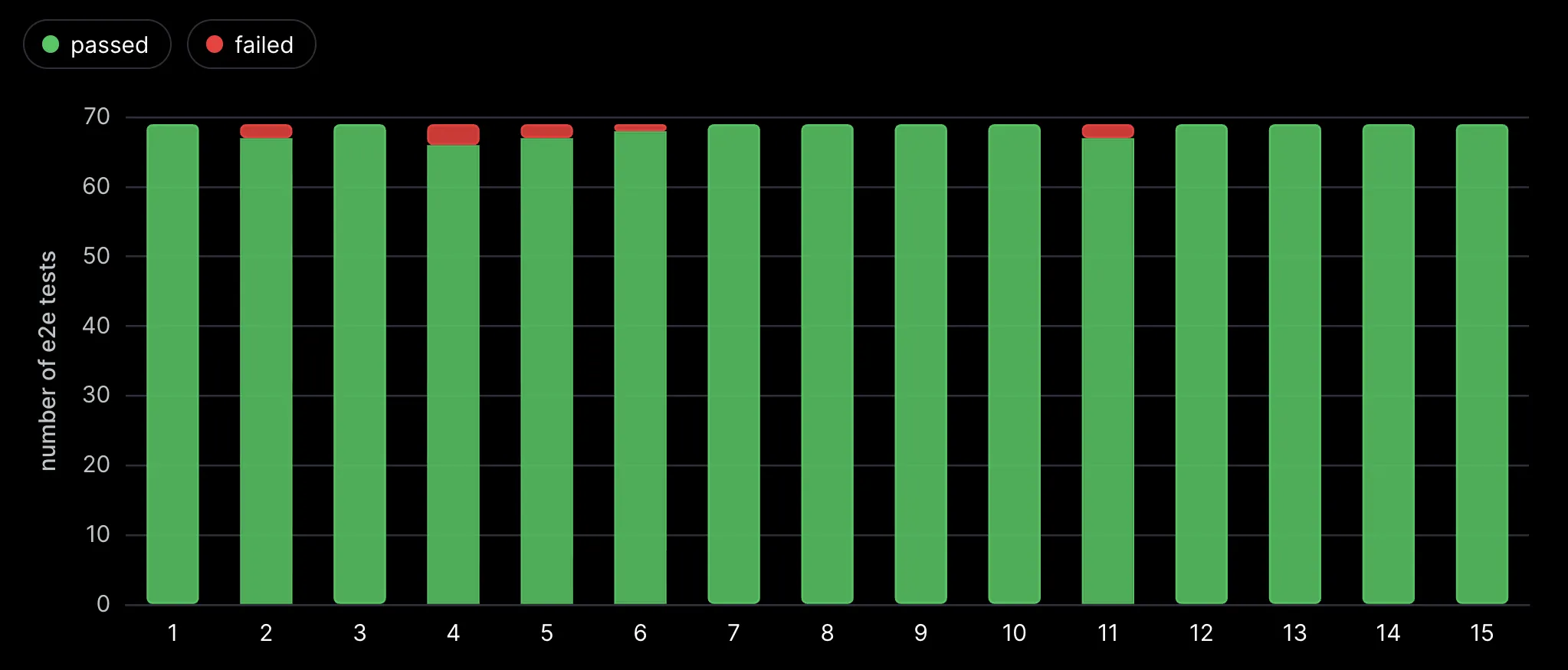
All 15 Angular runs passed TypeScript checks, while 6 of 15 React runs failed them, with 40 type errors where 12 were missing null checks. The Angular build type-checks, whereas Vite doesn’t by default, so all 6 React runs still built successfully. Notably, none of the 6 failing React runs executed tsc, while 8 of the 9 passing React runs did.
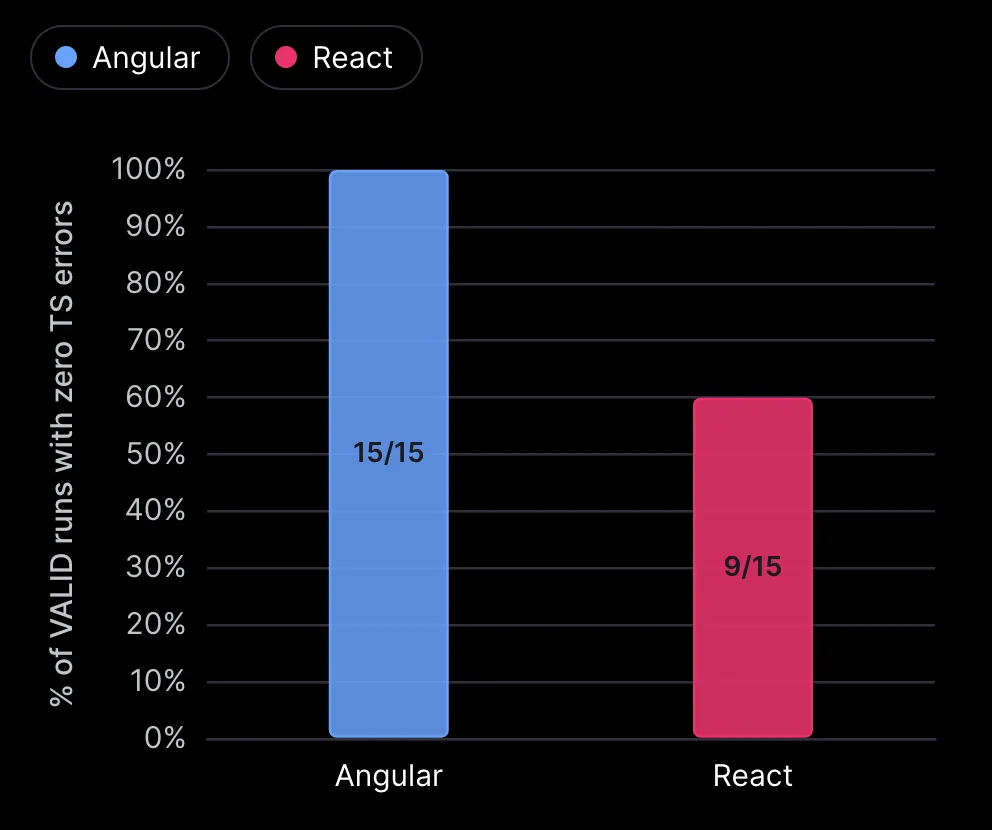
Takeaway: Angular catches type errors by default. React projects should explicitly include tsc --noEmit in the agent’s definition of done or hooks.
Cost depends on the agent’s decisions, not on the framework
Angular runs averaged $4.19 versus $4.37 for React, but individual costs ranged from $2.78 to $5.00. The 10 most expensive runs made about 50 more API calls than the 10 cheapest (135 vs 86 on average), increasing costs through repeated context processing rather than producing more code.
Takeaway: Agent decisions and turn count matter more than the framework.
Runs with agent-driven browser testing cost more
In 20 of the 30 runs, agents chose to test their applications in a browser. These runs were generally more expensive and took longer than runs where agents skipped browser testing.
Here’s how the two groups compared:
| Agent drove a browser | Agent didn’t | |
|---|---|---|
| Runs | 20 | 10 |
| Average cost | $4.50 | $3.84 |
| Average time | 24 min | 21 min |
| Met all 69 criteria | 70% | 80% |
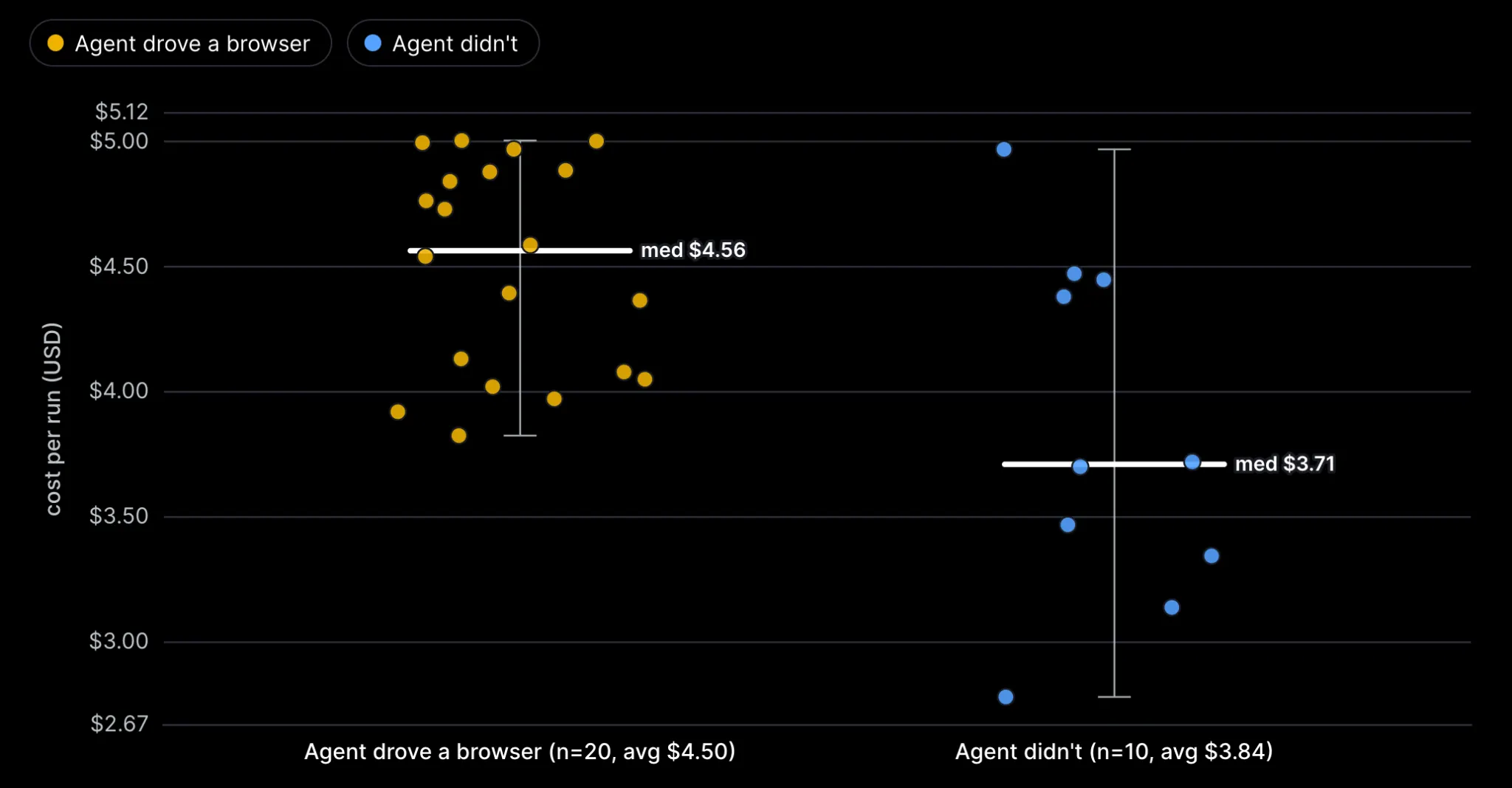
Runs with browser testing cost 17% more on average and took 3 minutes longer. The three most expensive runs were all React, at about $5.00 each. They launched a browser 10–15 times each, compared to a median of 7–8 in a browser-testing run.
Interestingly, browser testing didn’t translate into better results in this comparison: runs without it met all 69 criteria more often (80% vs 70%). However, with only 30 runs and agents independently deciding whether and how to test, the data isn’t enough to conclude that browser testing doesn’t help.
Takeaway: if you let the agent test in a browser, plan for the extra cost, because it can take a big part of a run’s cost.
With or without agent-driven browser testing, Angular runs were slightly cheaper
To see whether testing changes the cost picture between the two frameworks, I split the runs by whether the agent launched a real browser at least once:
| Angular | React | |
|---|---|---|
| No browser testing by the agent | 5 runs, avg $3.80 (23 min) | 5 runs, avg $3.89 (18 min) |
| Agent tested in a browser | 10 runs, avg $4.39 (24 min) | 10 runs, avg $4.61 (25 min) |
| Difference | +$0.59 per run | +$0.72 per run |
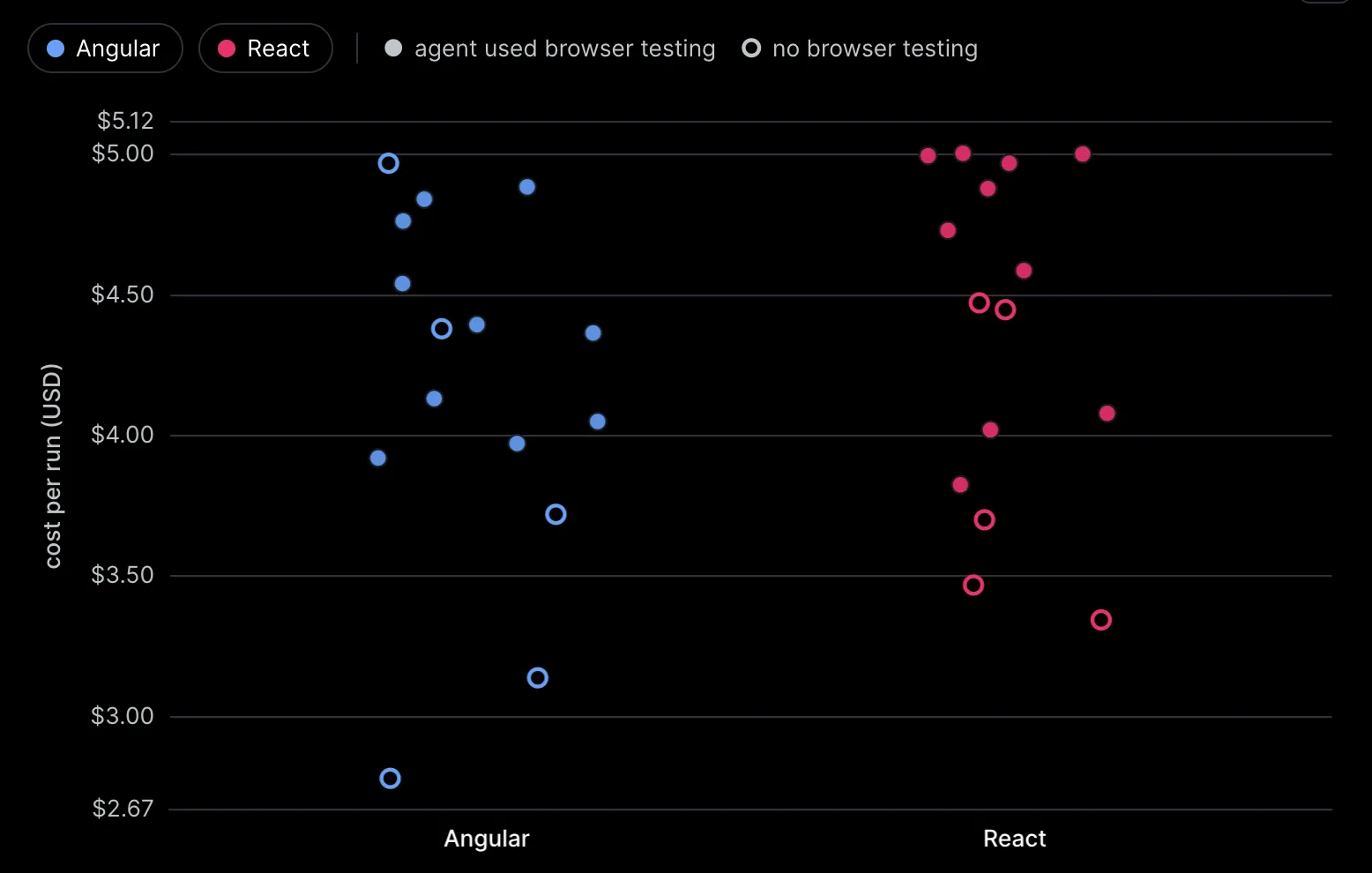
In both scenarios, Angular runs were a bit cheaper: by $0.09 without testing and by $0.22 with it. Runs in which the agent used a browser were $0.59 to $0.72 more expensive on average, more than the gap between the frameworks.
However, this doesn’t mean browser testing directly caused the higher costs. Agents struggling with implementation may have spent more time testing as well. And with only five runs per framework in the no-browser group, these results are indicative rather than conclusive.
Takeaway: The agent’s testing strategy may have a bigger impact on cost than the choice between Angular and React.
Infinite loop bug crashed the app in two Angular runs
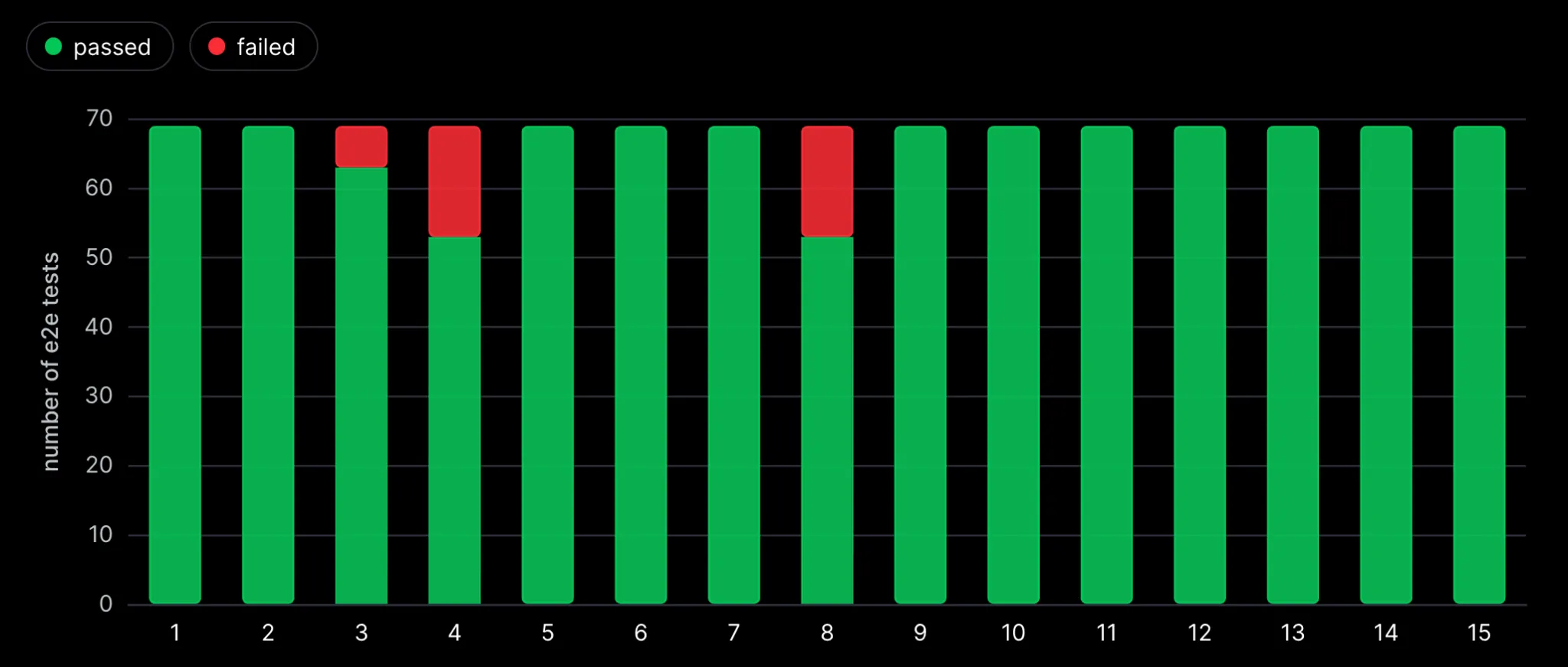
Two Angular runs produced the same infinite loop: an effect() indirectly read and updated the same signal, crashing checkout and causing 16 tests to time out. Both met only 53 of 69 criteria.
Takeaway: Agents should avoid updating reactive state inside effects in both Angular and React. Build, typecheck, and lint don’t easily catch these loops.
Agents don’t always know the latest library versions
About two-thirds of the React type errors came from MUI v9 API changes, for example, slotProps replacing older props. Agents that ran tsc found and fixed them. Agents that didn’t submitted code written for older MUI versions.
Angular had its own version of this problem: agents spent turns looking for the right animation modules. The difference was that the Angular build pointed them at the problem quickly.
Takeaway: if a library had a major release recently, make sure the agent checks its code against the installed version, with a typecheck or the library’s own docs.
Both frameworks met almost every acceptance criterion (96.3% in Angular, 99.0% in React)
The median run achieved 100% of the 69 acceptance criteria in both frameworks. The main difference was in the worst-performing runs: React’s weakest run passed 66 of 69 tests, while Angular’s two weakest runs passed only 53.
React had a slightly higher overall pass rate (99.0% vs. 96.3%), but most of the difference came from a single recurring bug in Angular. In runs 4 and 8, an effect() repeatedly triggered itself, causing the checkout page to crash. This resulted in 16 failed tests per run, accounting for 32 of Angular’s 38 failed tests.
Excluding those two runs, Angular passed 891 of 897 tests (99.3%), slightly above React’s 99.0%.
Takeaway: You don’t have to blindly follow AI trends and choose React just because everyone says you should. Angular remains a solid choice for AI-driven development and can be even more beneficial if your team already knows it well.
Angular chart - e2e tests per run
React chart - e2e tests per run
Conclusion: Is Angular better for AI development?
My hypothesis was that the framework matters less than people think. After 30 runs, the answer to our main question, how many acceptance criteria the agent delivers, is that the hypothesis held: the median run in both frameworks met all 69, React had the better worst case (95.7% vs 76.8%), and cost was about the same. Angular, as a framework, catches more of the agent’s mistakes, and that showed up in the typecheck results.
Based on our runs, Angular is at least as good a choice as React for AI-assisted work of this kind, and the safer one when it comes to type errors.
There are more AI experiments coming. If you have feedback, ideas, or questions, feel free to contact us.
One thing to keep in mind: What are the limits of this experiment?
- Only 15 runs per group, one task and one model. The findings about type errors and cost are the strongest.
- We compare two predefined stacks (Angular with Angular Material, React with MUI and Vite), not the frameworks in isolation. Results could be different with other libraries or build setups. We kept the stacks fixed across runs so the agent wouldn’t spend time choosing libraries.
- We didn’t use Angular or React MCP servers or skills. We tested the agent’s “raw” knowledge of writing the app.
Useful links: Agent Runs Repository
FAQ
Is Angular better than React for AI coding agents?
In our experiment, both delivered almost all acceptance criteria: the median run in each met 100% AC delivered. Angular's edge was type safety: no Angular run shipped TypeScript errors, while 6 React runs did.
Why did Angular apps have no TypeScript errors, while React apps did?
In Angular, type checking is built into the framework and the build, so a type error stops the build. With React and Vite, it's a separate tsc step. 6 of 15 React runs shipped TypeScript errors, and none of them ran tsc on their own.
How much does it cost to build an app with an AI agent?
In our runs, one cinema booking app cost $4.19 on average in Angular and $4.37 in React. Single runs ranged from $2.78 to $5.00. The cost depended mostly on how many API calls the agent made, not on the framework.
Can AI agents write Angular signals correctly?
Mostly, but watch for state updates inside effects. Two Angular runs created an effect() that indirectly read and updated the same signal, causing an infinite loop and crashing checkout. React's useEffect can cause similar issues. Agents should avoid updating reactive state inside effects and test reactive flows end to end.